Now Available — Free Download

All Enterprise features free for 3 months

Every signed-in user gets full Enterprise access to Kube Hammer until Oct 15, 2026. No credit card required.

Kube Hammer

Operations Engine

A Kubernetes desktop built for real operations.
AI-integrated.

Pods, logs, shell, YAML and RBAC unified in one UI. Every change is snapshotted before it is applied. AI diagnosis uses the full cluster context for root-cause analysis. Runs offline and sends zero telemetry.

Local Credentials
Air-Gapped Compatible
Full Audit Trail
context: production-eu-west
Total Pods

169

Live Cluster Events

7s Pulling image "nicolaka/netshoot"
13s Started container velero-repo-maintenance
15s Back-off restarting failed container api
18s Assigned velero/tenisapi-default-kopia
21s Back-off restarting obs-callhome-stats
47s Reconciliation finished, next run in 10m
Pod, Log, Shell
Core Operations
YAML, Graph, AI
Integrated Analysis
0
Telemetry Leakage
24+
Ready Plugins

Marketplace & Plugins

Extend Kube Hammer however you want.

Install plugins, templates and actions in one click — or write and publish your own. You decide how Kube Hammer grows.

Marketplace 46 plugins available
Browse Installed (47) Updates Developer
Plugins Templates Actions Sort: Relevance

Cluster Performance

kube-hammer

Free Installed

Command Palette

kube-hammer

Free Installed

eBPF Injection

kube-hammer

Enterprise Installed

AI Assistant

kube-hammer

Enterprise Installed
  1. Browse & install

    46+ official plugins, templates and actions. Filter by category, pricing and popularity; install and update with one click.

  2. Build your own

    Develop, package and publish your own plugin to the marketplace with the Developer tab and SDK 2.0 — AST-scanned for safety.

  3. You decide how to extend

    Extend via Plugins, Templates and Actions. Pick exactly what you need across Free, Pro and Enterprise tiers.

Operational Capabilities

Daily Kubernetes workflows,
unified in one UI.

Find workloads, inspect state, open a shell, tail logs and edit manifests — without switching between tools.

Resource Graph

See at a glance how your Ingress, Service, Deployment and Pods connect. Not just visual sugar — an interactive architecture graph designed for operational clarity.
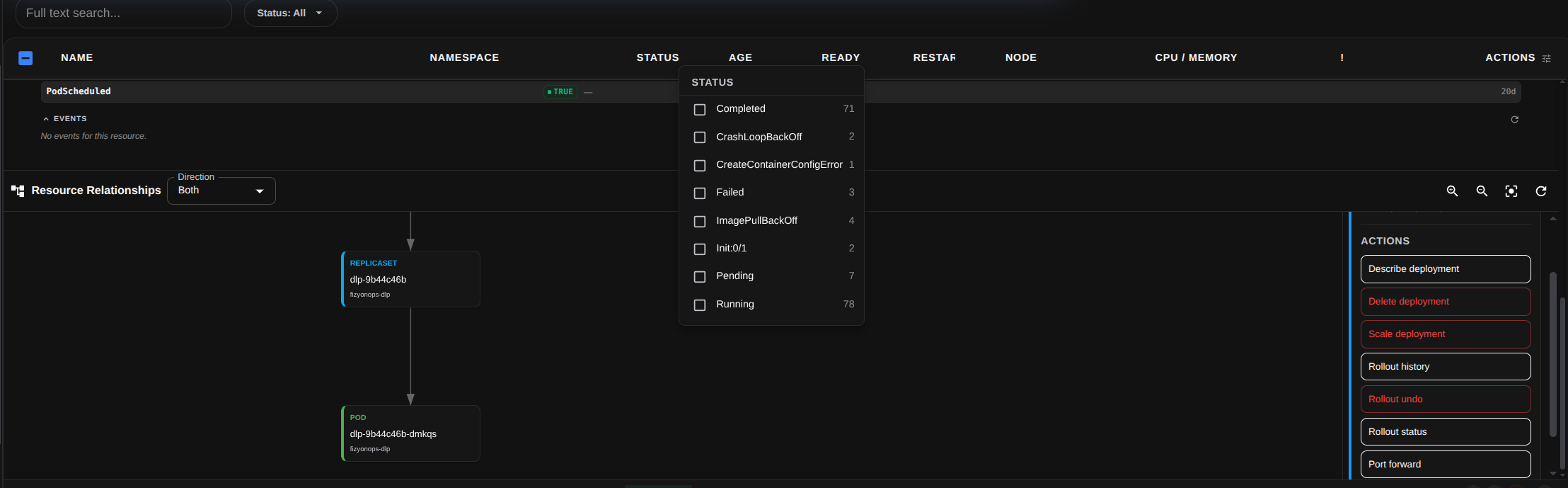
Kube Hammer Resource Relationships graph — ReplicaSet to Pod ownership with status filter and actions

Terminal & Real-time Logs

Full xterm.js terminal for multi-container pods. Stream logs in real time with regex filtering — no extra window needed.
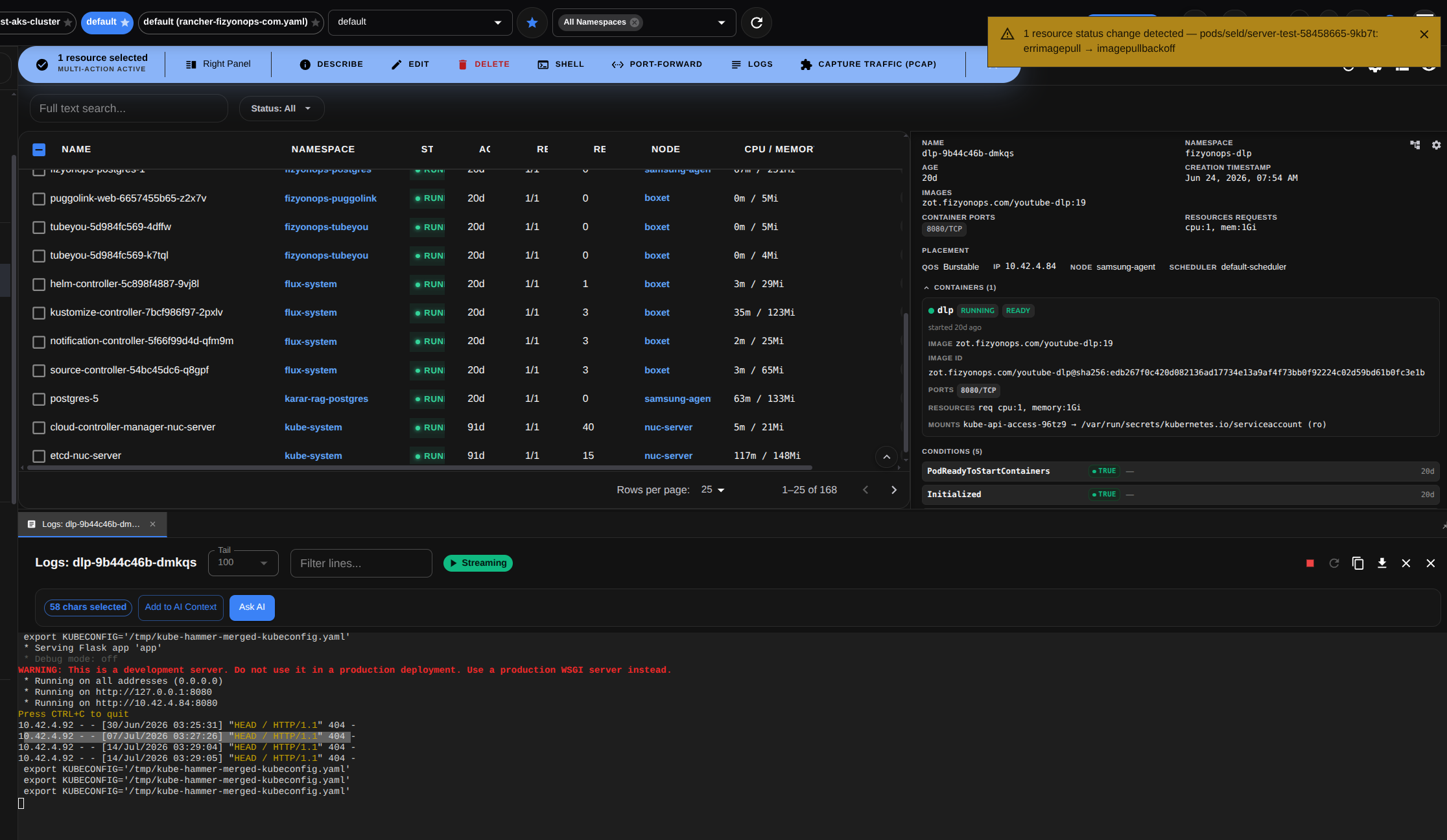
Kube Hammer resource list with detail panel and a live streaming log viewer with filter and Ask AI

AI Diagnosis: Cloud or Local

Two options: FizyonAI Cloud with end-to-end encrypted root-cause analysis, or bring-your-own-key Ollama for environments where no data may leave the network.
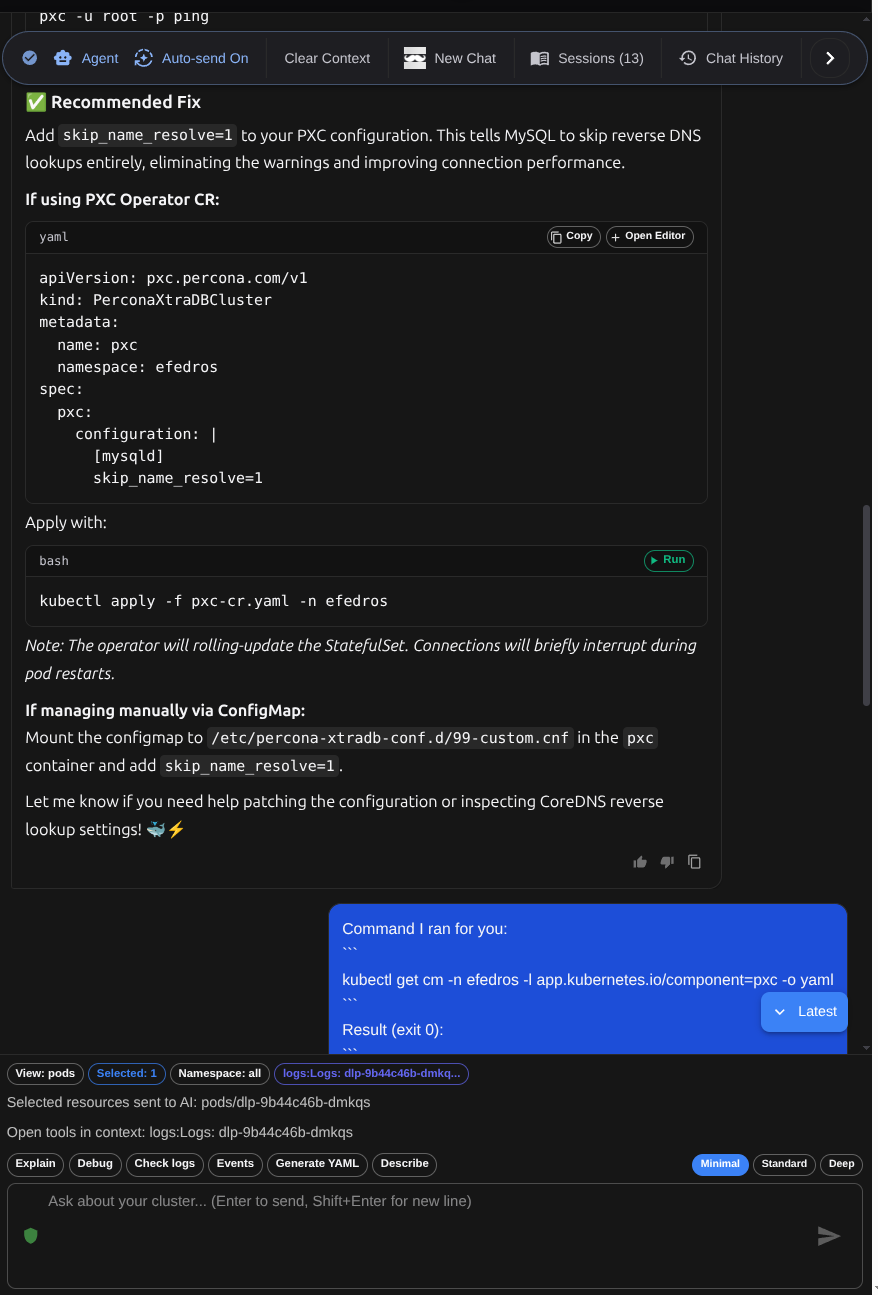
Kube Hammer AI assistant recommending a fix with runnable YAML and kubectl commands

Safe Operations Engine

Every change made through Kube Hammer is snapshotted before it is applied. Deleted resources can be restored with one click. Timed operations auto-revert on timeout. The Timeline tab overlays your actions against live Kubernetes events so root causes are easy to find.
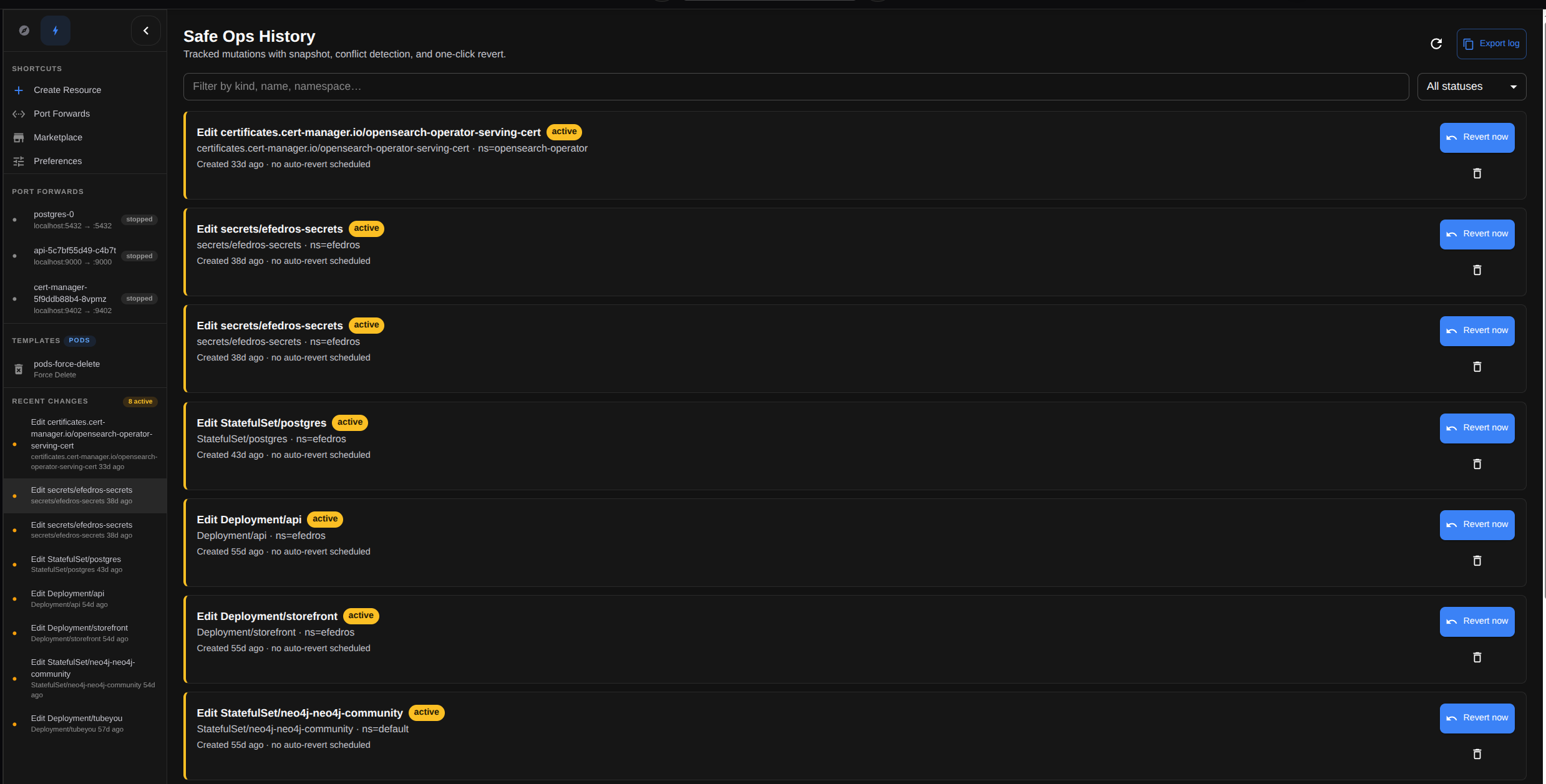
Kube Hammer Safe Ops History — tracked mutations with snapshot, conflict detection and one-click Revert now

Node Operations & Live Traffic Capture

Manage nodes right from the UI: cordon / uncordon for maintenance, drain to evacuate workloads safely, top for live CPU/memory, list a node's pods, and a one-click Net Tools shell. When you need it, Capture Traffic (PCAP) spins up an ephemeral netshoot container to capture live network traffic from any Pod or Node (full packet payloads, up to 60 seconds) and downloads a .pcap ready for Wireshark.
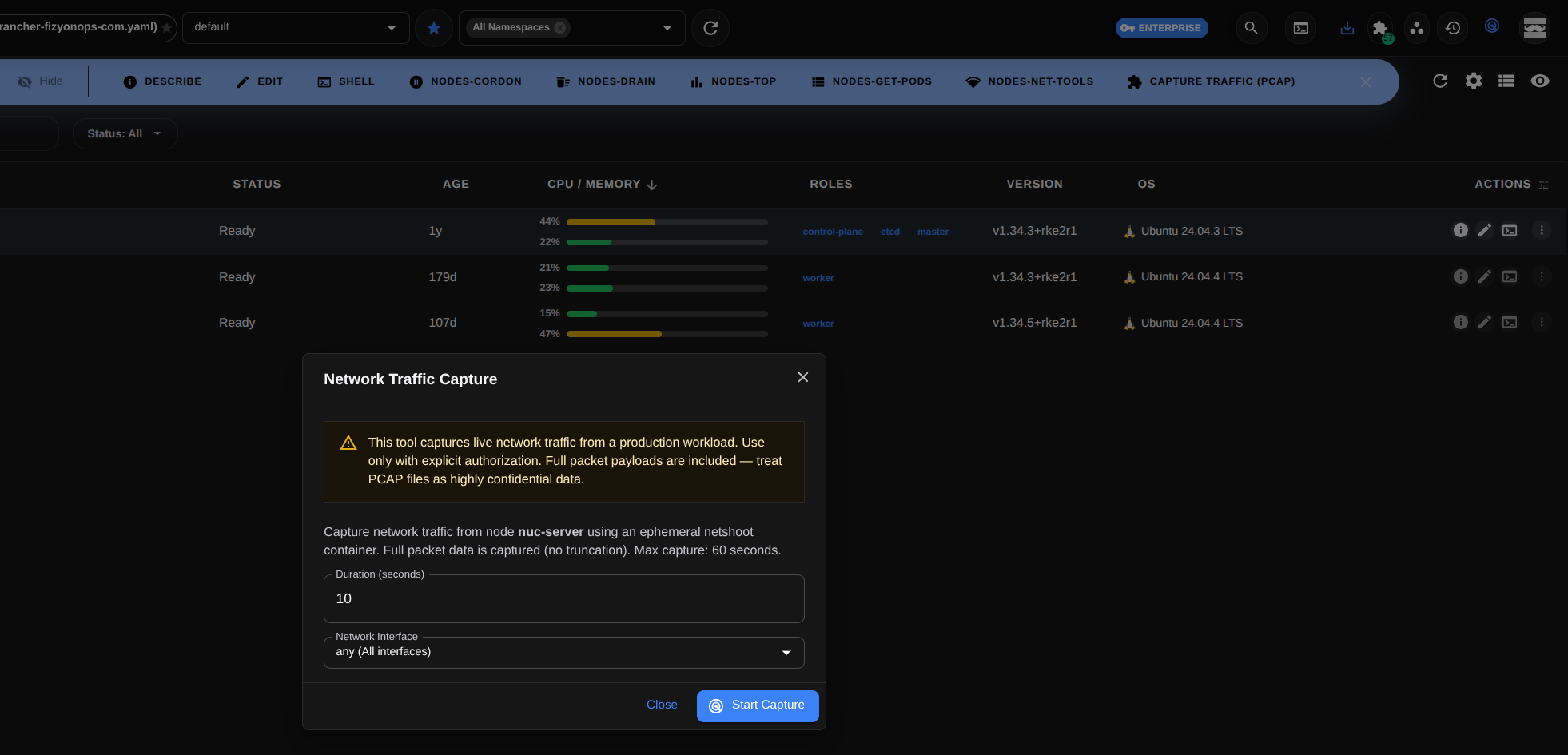
Kube Hammer node operations — cordon, drain, top and live PCAP traffic capture

Background Helpers

Small but powerful utilities that run quietly in the background while you work — just like traffic capture.

Event Exporter (Live & Batch)

Export cluster events as a one-time snapshot or watch and stream them continuously. JSON, CSV or plain text — with local-file output and size-based rotation.

Clipboard History

Keeps your last copied items (up to 100) so you can re-copy a command, certificate or log output with one click, and reorder them however you like.

Enterprise

etcd Backup

Scheduled etcd snapshots with retention, compression, encryption and multi-cloud storage — protecting your cluster state for disaster recovery.

Control How Actions Appear

Tailor the row actions for every resource type. Reorder them with arrow buttons, pick how many stay visible as primary with a slider — the rest fall into the "⋮" overflow menu. Pin the ones you use most as always visible. Both built-in actions and marketplace plugin actions are listed here, and your preference is saved per resource type.
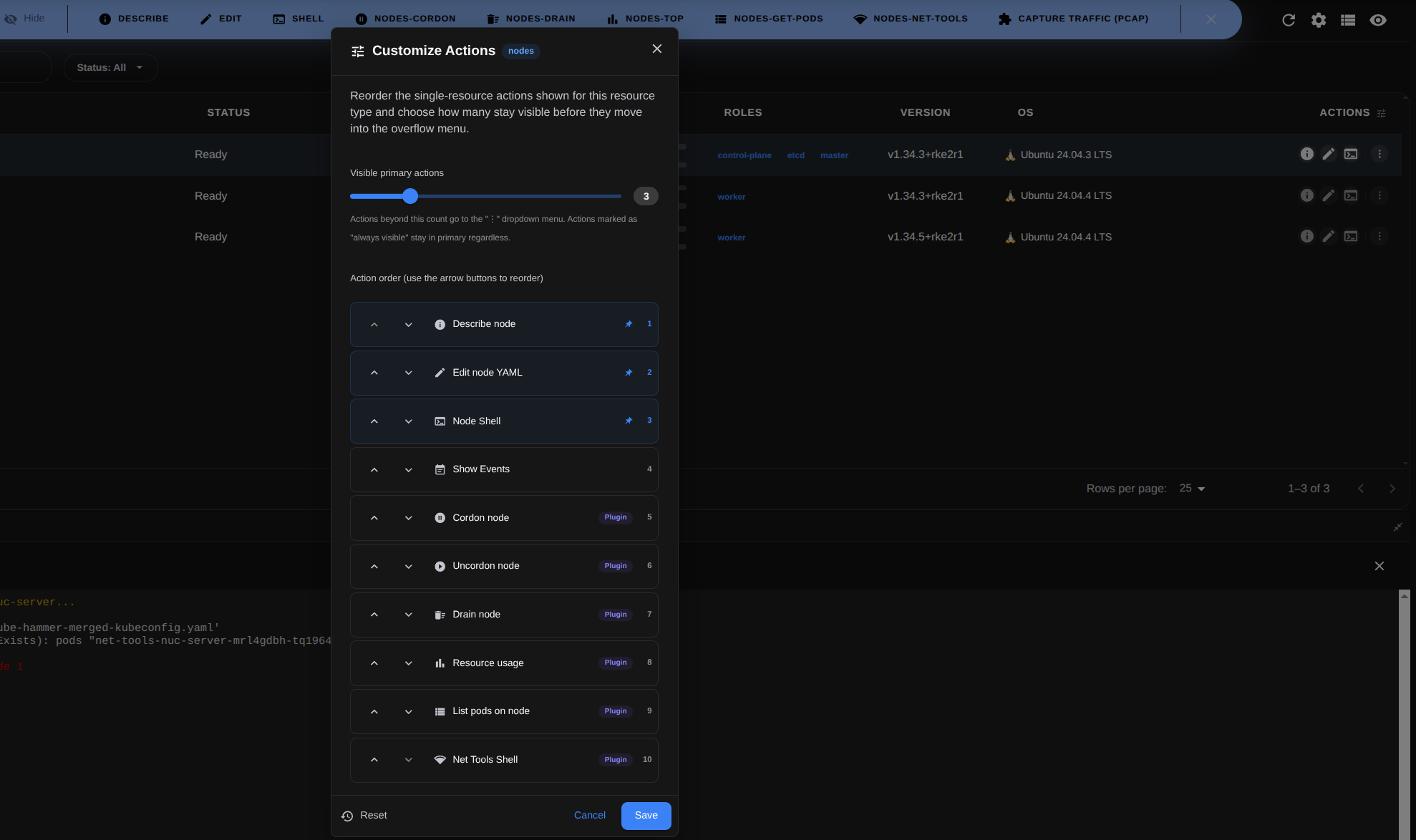
Kube Hammer Customize Actions — reorder, pin and set visible primary row actions per resource type

Control Which Actions Run

Define exactly which kubectl commands run for each resource type. Add your own actions using {name} and {namespace} placeholders, and set each one's name, description, icon, confirmation prompt, quick action and mutating (list-refresh) behaviour. Choose where the output goes: dialog, popup, bottom/right panel, detached window or external terminal.
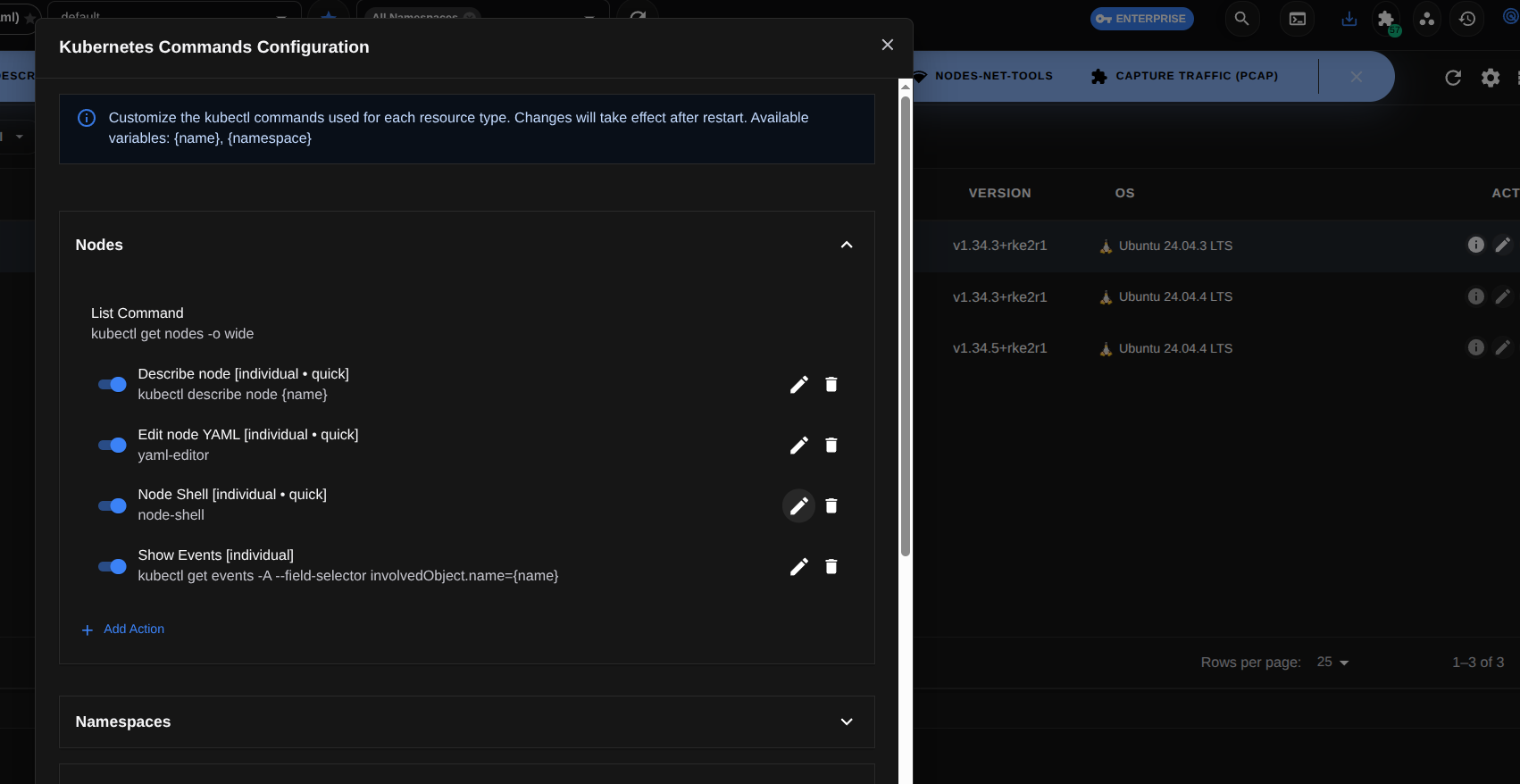
Kube Hammer Kubernetes Commands Configuration — define custom kubectl commands per resource type

Extend Resource Visibility with Templates

Decide exactly which fields appear in your resource tables. Build custom column templates per resource kind, turning any field of the raw Kubernetes object into a column via data paths like _raw.status.podIP. Show/hide columns, reorder them with arrow buttons, and align them left/center/right. Shape values with expression functions such as prettySize, age, percentage, colorize and conditional. Start from built-in views (Compact, Detailed, per-kind), set one as default, clone them, and import/export as JSON.
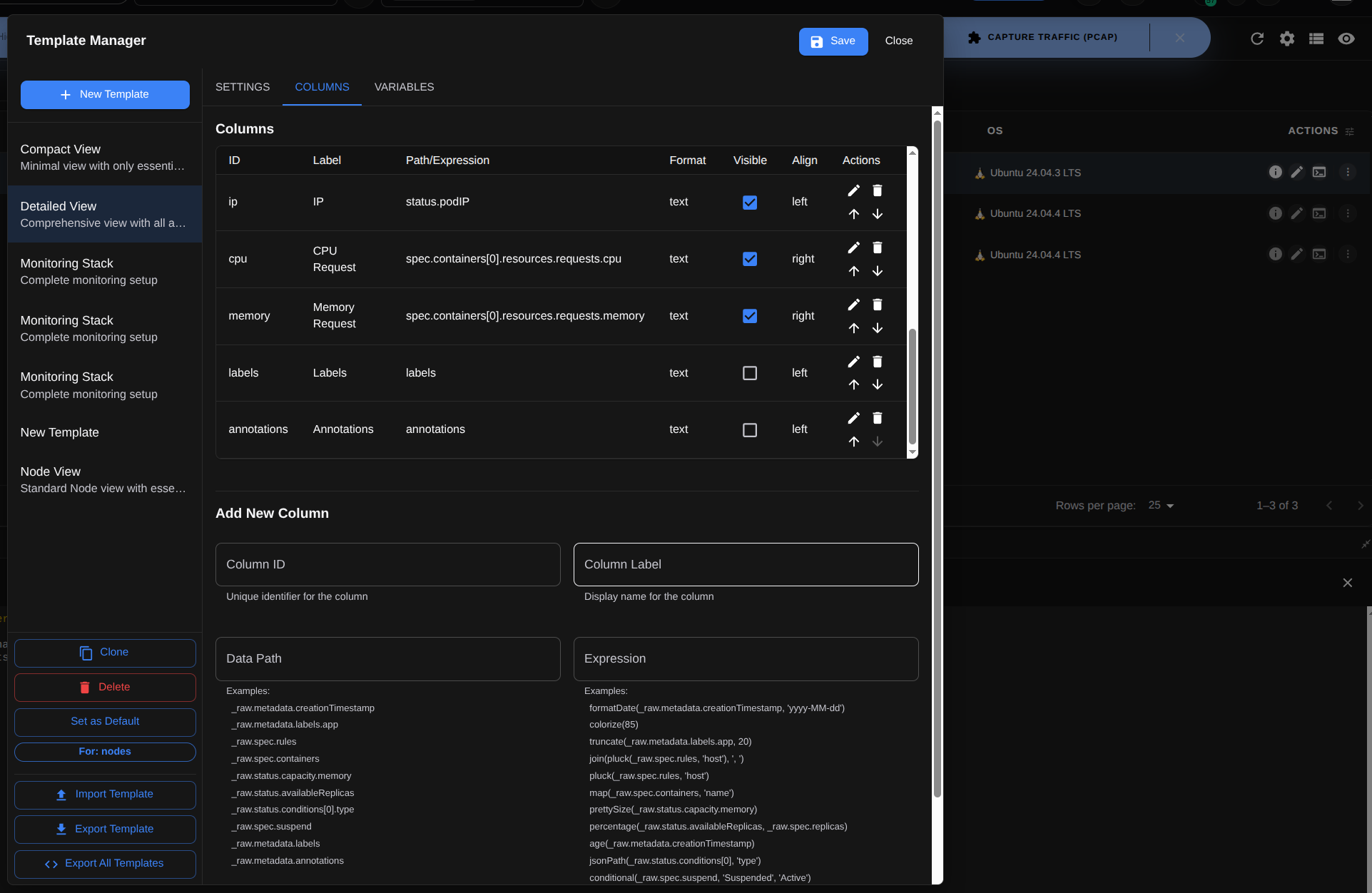
Kube Hammer Template Manager — customizable columns and expression functions

Endlessly Extensible with Plugins

Almost every capability in Kube Hammer is a plugin you can toggle on or off. Enable 50+ built-ins from the Plugin Manager: Flux GitOps (whose Drift Defender flags when the cluster diverges from Git and re-syncs with flux reconcile), Helm, the Trivy CVE scanner, TLS Detective, eBPF Injection, OpenTelemetry, etcd Backup, Chaos Simulator and more. Plugins aren't just tools — they add sidebar views, table columns (like Root Controller and Controlled By, derived from ownerReferences), row actions and YAML spec editors. Install from the marketplace, side-load your own from disk, or write one in minutes with the SDK.
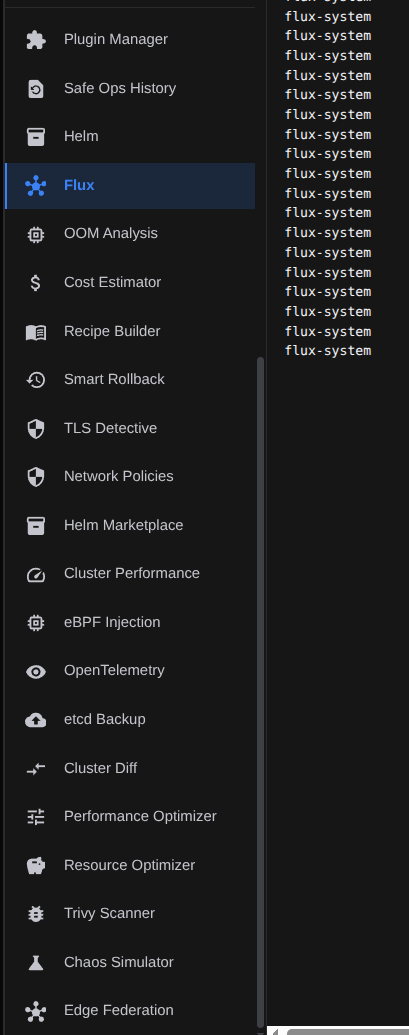
Kube Hammer plugin catalog in the sidebar — Flux, Helm, Trivy, TLS Detective and more

AI-Powered Recipe Builder

Describe what you need in plain language and the Recipe Builder reads the core engine's behaviour plus every installed plugin capability to generate a ready-to-run recipe or capability plan that combines them into a single operational workflow. It uses your configured AI endpoint (FizyonAI Cloud, Ollama or OpenAI-compatible), injecting all plugin capabilities into the LLM context. Start from pre-written templates — Safe rollout, Troubleshoot, Probe snooze, Change flow — so you extend Kube Hammer not only with plugins, but with natural language.
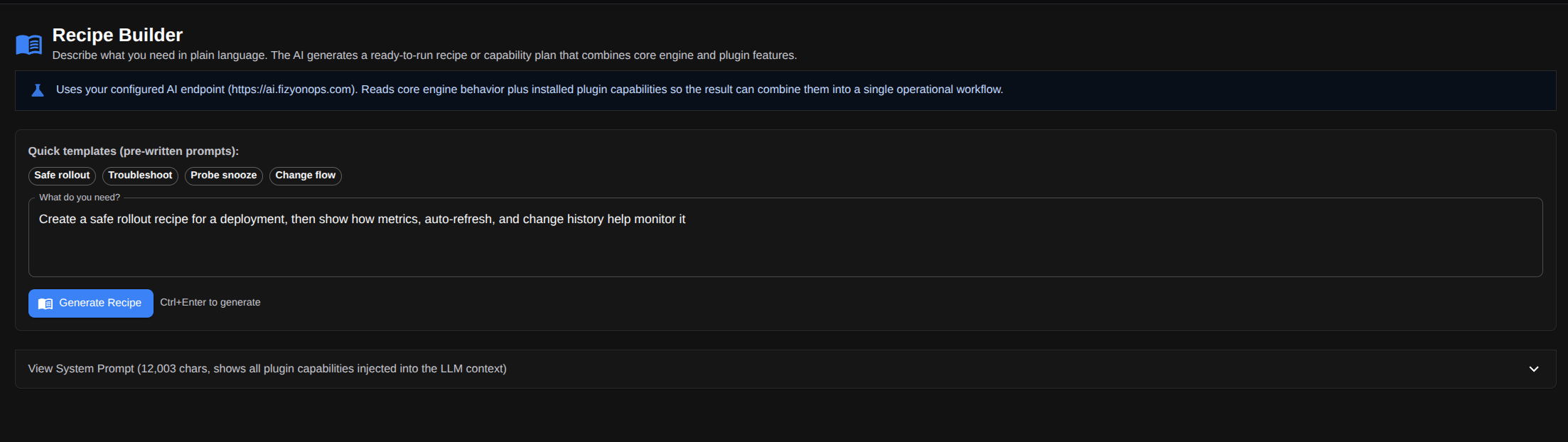
Kube Hammer AI Recipe Builder — generate a runnable recipe from plain language

Built-in AI

An assistant that understands your cluster — without leaving the terminal.

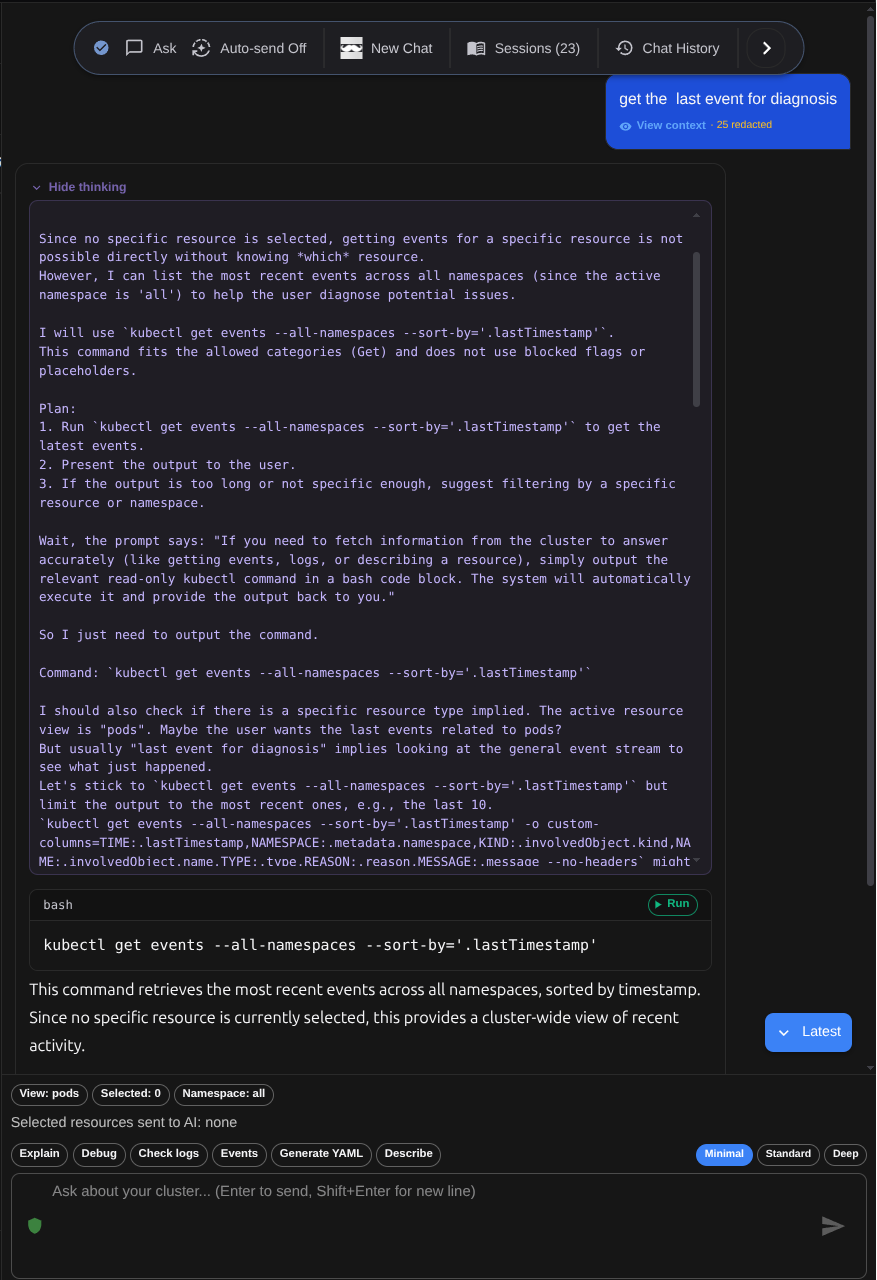
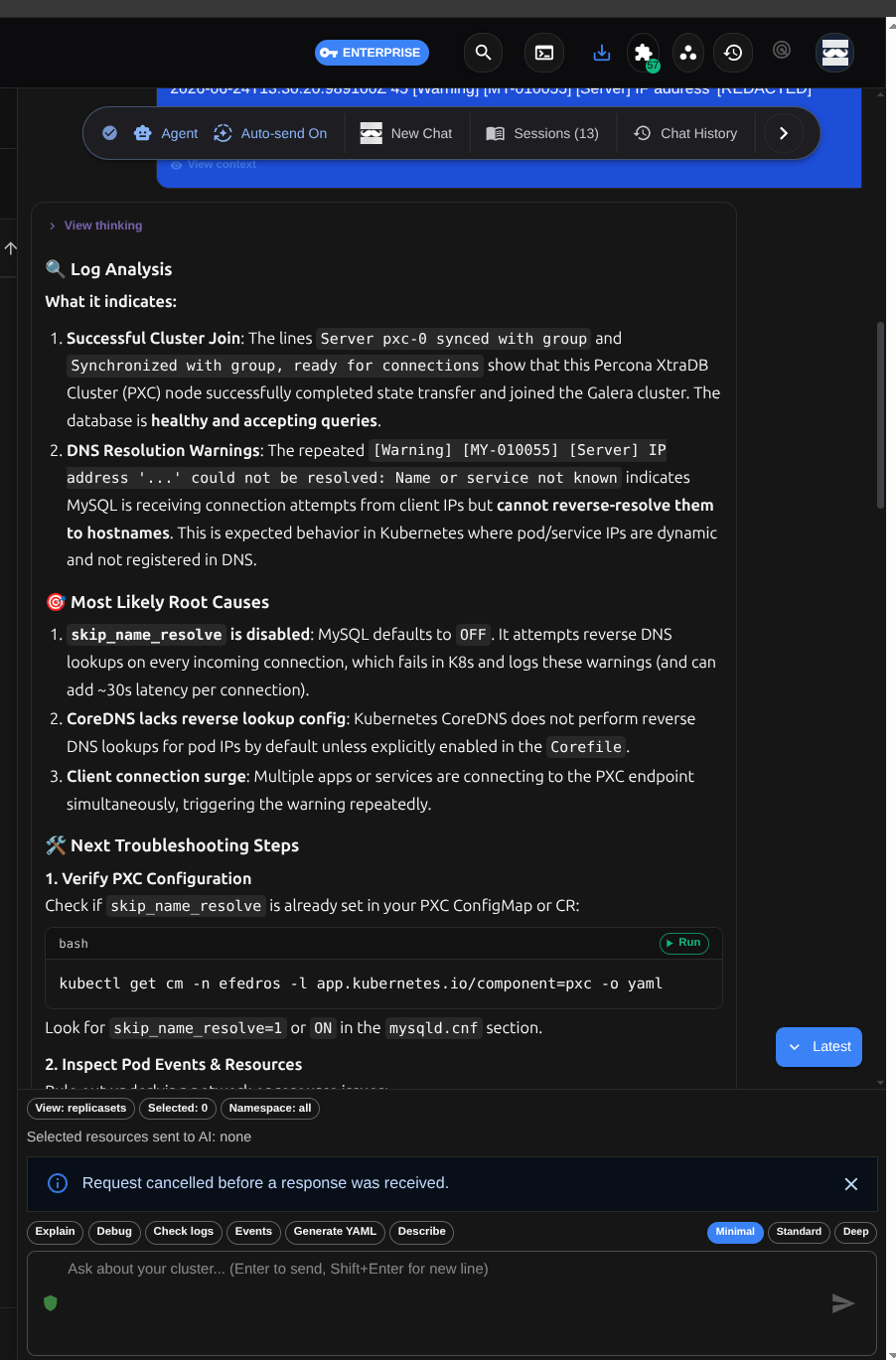
Kube Hammer's AI assistant reads your logs and events, finds the root cause, and either suggests kubectl commands or safely runs them for you — all with the context of the resources you've selected, right inside the panel.

Kube Hammer AI Assistant analyzing logs and surfacing root causes
Kube Hammer AI Assistant showing its reasoning with redacted context before running a kubectl command

Log Analysis & Root Cause

Interprets raw logs and events to surface the root cause — CrashLoopBackOff, OOMKilled, a failing probe, a missing secret — then walks you through step-by-step remediation.

Agent & Ask Modes

In Agent mode the assistant auto-runs whitelisted kubectl commands and iterates on the output. In Ask mode it only proposes commands — nothing runs until you press Run.

Automatic Output Loop

With Auto-send on, every executed command's result is fed back to the assistant so it advances the diagnosis on its own (up to 3 follow-up steps). With it off, you forward output manually.

Quick Actions

One click on a selected resource for Explain, Debug, Check logs, Events, Generate YAML and Describe. Each button sends a ready-made diagnostic prompt to the assistant.

Context Depth

Choose Minimal, Standard or Deep. Minimal sends only core context; Standard adds open panels and filters; Deep also attaches recent errors, events, command outputs and selected log snippets.

Resource & Namespace Awareness

Namespace-aware by design. Pods, deployments and other resources you select in the table — multiple kinds at once — enter the assistant's context, and you can see exactly what's sent.

Runnable Commands

The kubectl commands the assistant generates arrive inline with Run and copy buttons. They execute safely in-app, gated by an allowed-command list and a 15-second timeout.

Sessions & Chat History

Open independent, named chat sessions (up to 30); past messages (up to 100) are stored on your device. Keep context tidy with New Chat, Sessions and Chat History.

Streaming & Reasoning View

Answers stream live as markdown. Expand a separate 'View thinking' section to inspect the model's reasoning steps, or just read the final result.

Your choice of provider: FizyonAI Cloud · local Ollama · OpenAI-compatible endpoints (BYOK). Before any request leaves your machine, secrets, base64 values and Kubernetes secret fields are automatically redacted.

Full Capabilities

Everything Kube Hammer can do

A growing library of 45+ built-in and marketplace capabilities spanning operations, AI, security, FinOps, GitOps, and observability.

AI Assistant — Ollama, LM Studio, BYOK & Cloud Smart Troubleshooting (CrashLoopBackOff, OOMKilled) AI Recipe Builder Terminal, Shell & Live Logs Command Palette (⌘K) Multi-Cluster View Cluster Diff & Drift Detection Encrypted Workspace Sync Safe Apply & Auto-Revert Safe Ops Timeline Smart Rollback etcd Backup & Restore Resource Graph (DAG) Network Policy Visualizer RBAC Matrix Metrics & Performance Dashboard Trivy CVE Scanning Security Audit Cert-Manager & TLS Cloud Auth Detection (EKS, GKE, AKS) Cost Estimator Resource Optimizer (FinOps) OOMKiller Right-Sizer Helm Releases & Charts Flux GitOps OpenTelemetry Auto-Instrumentation eBPF Injection Edge Federation Network Sniffer (PCAP) Chaos Simulator Customizable Column Templates & Views YAML Schema Validation Node & Job Management Cluster Audit Event Exporter — Live & Batch Clipboard History Secret Decoding & Base64 Tools Resource Visualization Charts Performance Optimizer Helm Chart Marketplace Named Workspaces & Contexts Lens-Compatible Columns Plugin SDK & Marketplace Cross-Platform Desktop

Comparison

One tool, the entire workflow.

From pod management to embedded AI, from snapshot-based safe operations to air-gapped compliance — see what Kube Hammer solves on its own for day-to-day operations.

Capability Kube Hammer kubectl Lens k9s
Visual UI + integrated terminal & logs
Relational resource graph (DAG)
Built-in AI diagnostics (Cloud / local Ollama)
Snapshot + auto-revert safe operations
Offline / air-gapped operation
Zero telemetry (off by default)
Plugin SDK + marketplace

Comparison is based on publicly available feature information and is for reference only. Every tool is strong in its own domain.

Security & Governance

Security-first by design.

Snapshots before every change, conflict checks on revert, AST-scanned plugin sandboxing. Your credentials never leave your machine. Built to the standards DevSecOps teams demand.

AST Malware Scanning

Every marketplace plugin passes Abstract Syntax Tree (AST) static analysis. Obfuscated payloads and hidden exfiltration attempts are automatically blocked.

Plugin Sandboxing

Plugins run in strict isolation. If a UI-only plugin tries to access the network, the Kube Hammer core blocks it at runtime.

Cryptographic Licensing

MitM-resistant. Enterprise tool licenses use RSA-signed JWTs verified against hardcoded public keys.

Air-Gapped & SSO Compatible

Zero inbound ports required. Supports enterprise SSO and offline install for heavily audited environments. Never sends telemetry by default.

Cluster Drift Detection & Time Travel

ClusterDiffEngine structurally compares every resource between two cluster contexts (e.g. prod vs staging). ResourceSnapshotStore keeps a 24-hour ring buffer of state, answering "what did this pod look like 30 minutes ago?" exactly.

> HAMMER_SDK_V2

SDK 2.0: production-grade internal tools.

No DSL to learn. The plugin SDK is built on React and Zustand. It ships a Worker pool for heavy work, a ServiceBus for cross-plugin messaging and an ActionPipeline for intercepting commands.

UI Slots

Inject React components into well-defined points of the UI.

Strict Permissions

Sandboxed architecture. Declare network access explicitly in the manifest.

CRD Registrar

Add your custom resource types to the left nav as if they were native.

Service Bus

Decoupled, safe communication between plugins.

MyFeaturePlugin.tsx
import React from 'react';
import { registerPlugin, createPluginSDK } from '@kube-hammer/sdk';

// 1. Eklenti arayüzünü kaydet
registerPlugin({
  id: 'custom-ci-viewer',
  label: 'Internal CI/CD',
});

// 2. Genişletme noktalarını aktifleştir
export default function activate() {
  const sdk = createPluginSDK('custom-ci-viewer');

  /* React bileşeni enjekte et */
  sdk.slots.register(
    'sidebar-top',
    () => <MySidebarComponent />
  );

  /* Pod'lara Sağ Tık menüsü ekle */
  sdk.resources.addAction({
    id: 'trigger-pipeline',
    label: 'Boru Hattını Yeniden Başlat',
    resourceTypes: ['pods'],
    handler: async (resource) => {
      await window.kubectl.execCommand(
        \`kubectl rollout restart \${resource.name}\`
      );
    }
  });
}
Main > src > plugins > internal
UTF-8 TypeScript

Transparent pricing, flexible plans.

Community is free forever for individuals. Choose Enterprise for strict governance, air-gapped architecture and centralized management.

Launch offer: free Enterprise access for every signed-in user until Oct 15, 2026.

Community

Free

Core features for individuals and small teams.

  • All core K8s operations
  • Terminal & Log streaming
  • YAML editor
Download Free
Most Popular

Pro

$17/user/month

Advanced analytics, cross-device sync and architecture diagnostics.

  • Everything in Community
  • Encrypted Workspace Sync
  • Architecture graphs & detailed diagnostics
Buy License

Enterprise

$28/user/month

For heavily audited organizations and air-gapped architectures.

  • Everything in Pro
  • FizyonAI or local Ollama integration (air-gapped)
  • Live traffic capture (PCAP) & event export
  • Enterprise SSO integration
  • Air-Gapped install & 24/7 SLA
Talk to Sales
Your Questions

Frequently Asked Questions

Why not just use kubectl?
kubectl is fantastic for surgical tasks. Kube Hammer wraps the daily routine — pods, logs, shell, YAML editing, DAG visualization — into a single UI without making you abandon your terminal. You can still use kubectl from Kube Hammer's integrated terminal whenever you want.
Do my credentials leave my device?
No. Kube Hammer reads your local ~/.kube/config and talks directly to your cluster API server. No credentials are sent to Fizyonops or any third-party service. Telemetry is off by default.
How is this different from expensive alternatives?
Most Kubernetes GUIs are either too simple (dashboards) or too expensive (enterprise licenses). Kube Hammer ships the full daily workflow in the free Community edition and only charges when you need built-in AI, relationship graphs or enterprise governance.
Will there be a browser demo?
Yes. We are building a sandboxed browser demo so you can try the product without installing anything. Tick the "guided demo" option on the download form to be notified when it is ready.
How do downloads work?
After you submit the form, a private Product Portal link arrives in your inbox. It hosts signed installers for Linux, macOS and Windows along with future update channels.
How do team invites work?
Every account ships with an invite quota for your team. Invitees get their own portal, and you assign roles and cluster access from a single place.
Get the App

Download and start in minutes.

Native installers for Linux, macOS and Windows. Drop in your kubeconfig and manage clusters locally with scoped tokens. No signup wall — just pick your platform and download the latest signed build.

Cross-Platform Builds

Signed installers for Linux (.deb / .rpm), macOS (Apple Silicon and Intel) and Windows (.exe); Android on Google Play.

Team Invitations

Bring teammates onboard with role-based invites and manage cluster access from a single portal.